Canonical inputs
R2 publishes the metadata, full-text, and BGE vector datasets used to reproduce the derived indexes.
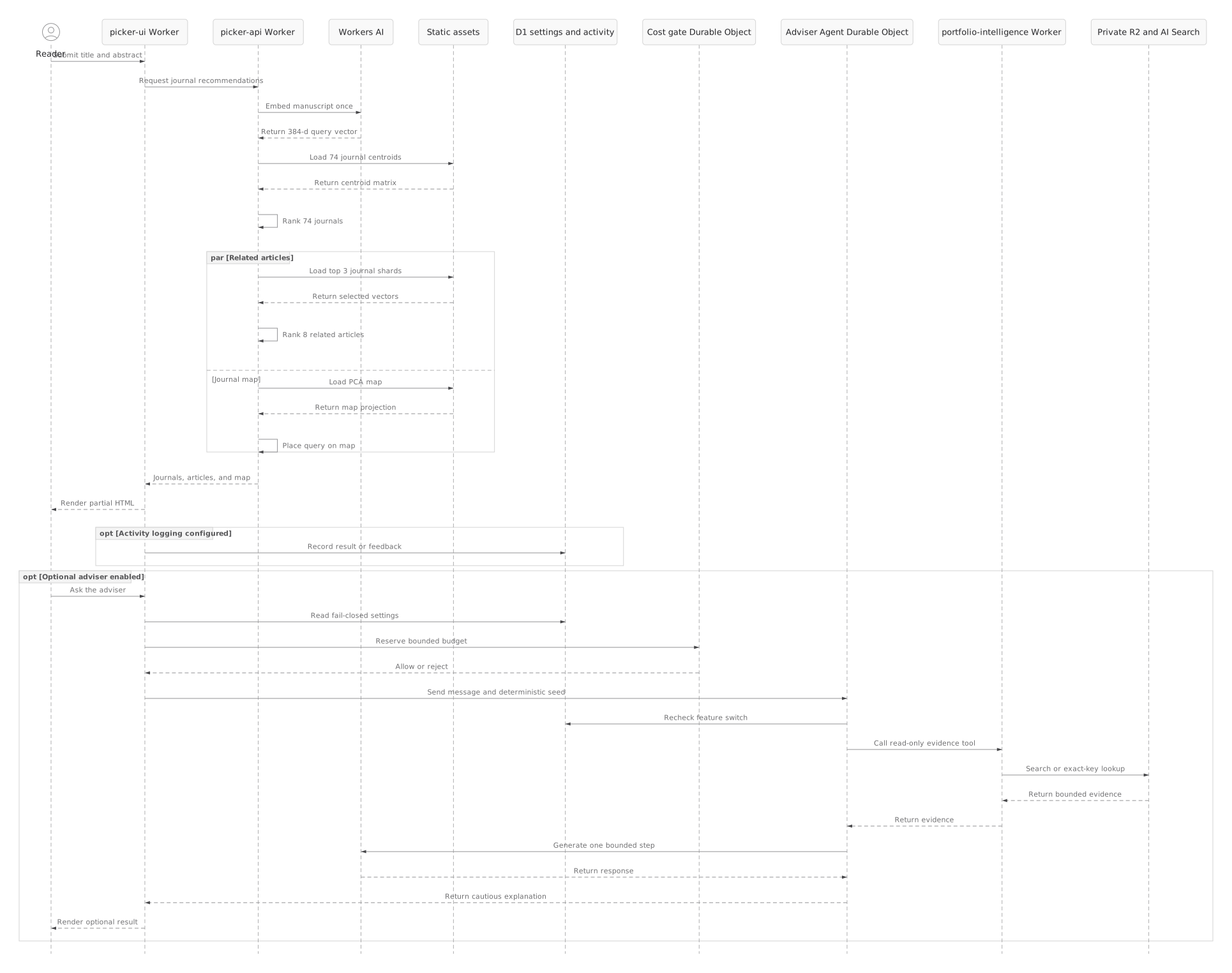
Two deterministic diagrams explain the system at different scales: the offline data lifecycle that produces bounded assets, and the live request sequence that consumes them.
The large corpus belongs in the rebuild path. Catalogs, exact object keys, ordered article IDs, and matrix dimensions are verified before any deployable artifact is produced. The runtime receives immutable derivatives rather than a monolithic corpus scan.
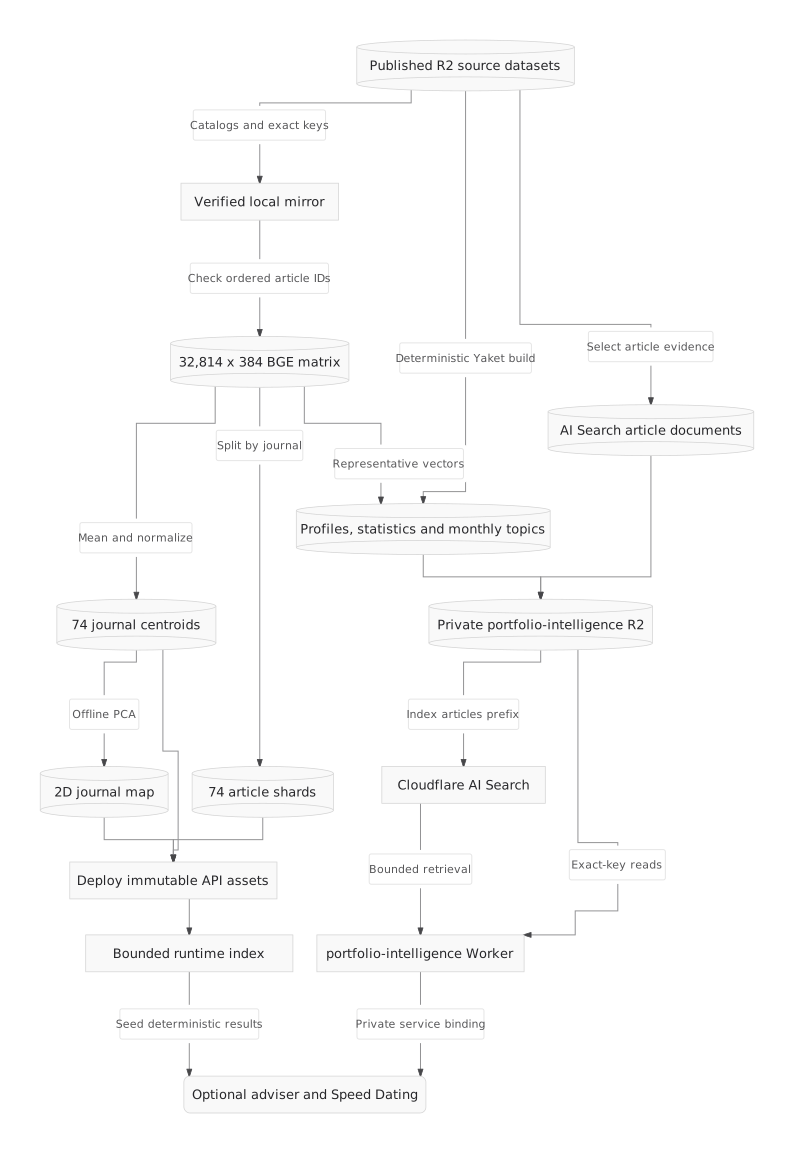
R2 publishes the metadata, full-text, and BGE vector datasets used to reproduce the derived indexes.
The ordered ID sidecar must match the corpus loader exactly; disagreement stops the build.
Seventy-four centroids, seventy-four article shards, and one BGE/PCA map are versioned with the API.
The same 384-dimensional query vector drives journal ranking, related-article ranking, and map placement. Related articles and map work run as enrichments after the 74-centroid ranking; optional D1 activity logging remains outside recommendation correctness.
| Operation | Maximum live scope | Why it stays bounded |
|---|---|---|
| Query embedding | One manuscript | Workers AI is invoked once and its vector is reused. |
| Journal ranking | 74 centroids | Article vectors are averaged and normalized offline. |
| Related articles | Top 3 journal shards | The journal result narrows the article candidate set first. |
| Map placement | One stored PCA projection | The 384-to-2D basis is computed offline and reused. |
| Activity logging | One optional D1 write | Failure is ignored by the matching path. |
What is absent is as important as what is present: no author analytics, all-author fingerprint build, TF-IDF portfolio rebuild, full-matrix scan, or runtime R2 listing occurs while a user waits for a recommendation.
These sources are kept beside the rendered SVGs. Agentic Mermaid version 0.1.2 parsed and structurally verified both before strict SVG rendering.
flowchart TB
  R2[(R2 source datasets)] -->|Catalogs and exact keys| Mirror[Verified local mirror]
  Mirror -->|Check ordered article IDs| Full[(32,814 x 384 BGE matrix)]
  Full -->|Mean and normalize| Centroids[(74 journal centroids)]
  Full -->|Split by journal| Shards[(74 article shards)]
  Centroids -->|Offline PCA| Map[(2D journal map)]
  Centroids --> Deploy[Deploy immutable API assets]
  Shards --> Deploy
  Map --> Deploy
Deploy --> Runtime[Bounded runtime index]sequenceDiagram
actor Reader
participant UI as picker-ui Worker
participant API as picker-api Worker
participant AI as Workers AI
participant Assets as Static assets
participant D1 as Optional D1
Reader->>UI: Submit title and abstract
UI->>API: Request journal recommendations
API->>AI: Embed manuscript once
AI-->>API: Return 384-d query vector
API->>Assets: Load 74 journal centroids
Assets-->>API: Return centroid matrix
API->>API: Rank 74 journals
par Related articles
API->>Assets: Load top 3 journal shards
Assets-->>API: Return selected vectors
API->>API: Rank 8 related articles
and Journal map
API->>Assets: Load PCA map
Assets-->>API: Return map projection
API->>API: Place query on map
end
API-->>UI: Journals, articles, and map
UI-->>Reader: Render partial HTML
opt Activity logging configured
UI->>D1: Record result or feedback
end